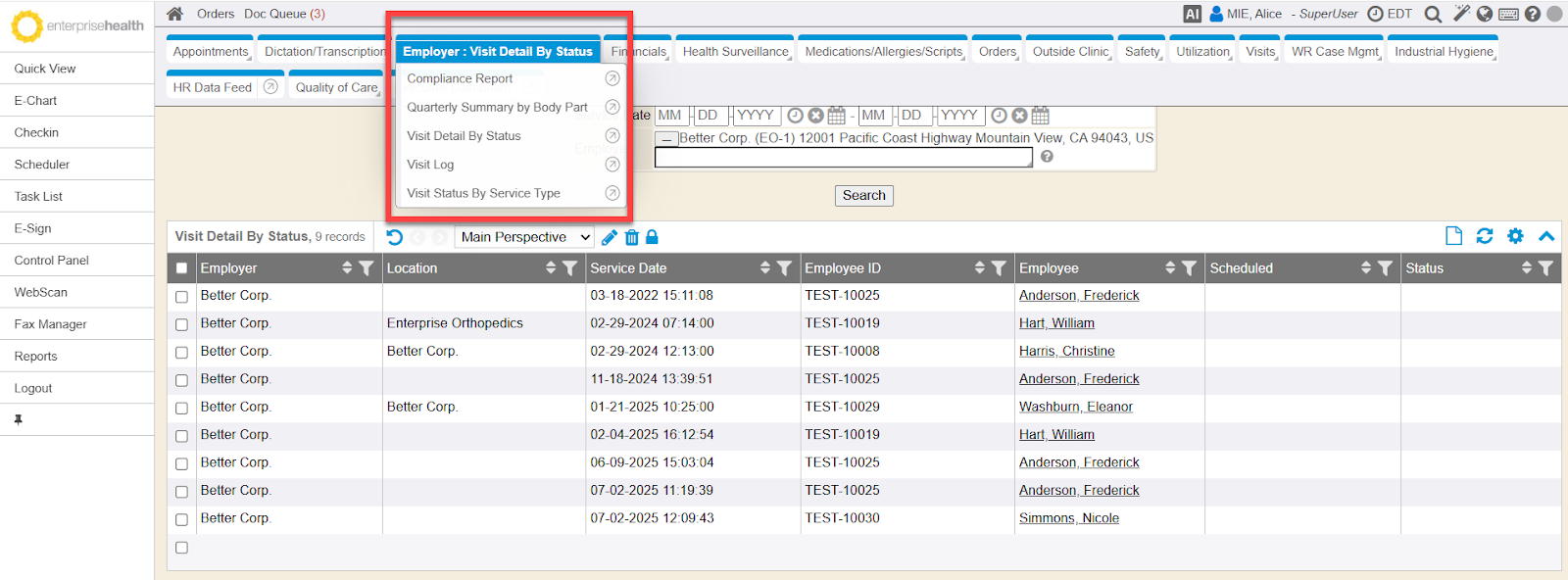
A new reports tab called Employer has been added to the Reports module. This tab is intended for clinical staff/administrators to run specific employer related reports. A similar version of these reports is also available on the BlueHive Employer Portal only. There are 5 specific Employer Organization Reports. The Compliance Report tracks and manages compliance requirements based on orders generated from a deal for an employer organization (EO) and sub-employer organizations. The Quarterly Summary by Body Part Report contains specific fields (e.g., Body Part Affected, Totals by Quarter, Totals by Year) grouped by client and location to track and manage injury-related data. The Visit Detail by Status Report contains specific fields (e.g., EO, Sub EO, Location Where Services Were Rendered, Service Date, Patient Name, Services Scheduled, Visit Status) that allows the employer to view a detailed status of what the employee’s clearance is pending for. The Visit Log Report details encounter data specific to an employer organization and the linked location of the service. The Visit Status by Service Type Report contains specific fields (e.g., EO, Sub EO, Location Where Services Were Rendered, Service Date, Patient Name, Services Scheduled, Visit Status) that allows the employer to view a detailed status of what the employee’s clearance is pending for.
- RC: 202409 and newer