Submitting a feature request is an excellent way to provide feedback and contribute to the improvement of a software application. To ensure that your request is clear and actionable, follow these instructions:
Write a Clear Title: Choose a concise and descriptive title for your feature request. This title should accurately summarize the desired functionality or improvement.
Provide a Detailed Description: In the body of your feature request, provide a clear and detailed description of the feature you are requesting. Be specific about the problem or need you are trying to address and explain how the proposed feature would solve or improve it. Include any relevant use cases or examples to illustrate the benefits.
Prioritize and Justify: If applicable, explain why the requested feature is important and how it compares to other existing features or improvements. Justify why it should be prioritized over other potential enhancements.
Provide Supporting Information: If you have any additional information or resources that can support your feature request, include them. This could include mockups, diagrams, user stories, or references to similar features in other applications.
By following these instructions, you can effectively communicate your feature request and contribute to the ongoing development and improvement of the software application.
There is a new report named OSHA 300/301 Case Data Report. This provides columns of data for OSHA recordable cases/incidents having a date of the PRIOR year to today’s logged in session of running the report. The Department of Labor (DOL) Occupational Safety and Health Administration (OSHA) Injury Tracking Application (ITA) provides a system to securely access and submit information related to workplace injuries. Their application is being enhanced to begin collecting details on individual injury and illness cases. Our OSHA 300/301 Case Data Report is a method to produce a large data output to bulk upload larger data sets using API endpoints that can be used in their upload to self-report on an annual basis. This report provides the fields that make up the body of most of the Request API calls involving the Case Data form.
This is a new report available in in the March 2021 upgrade version and newer
How do I learn more:
A quick 4min video regarding the changes to the Case Report view and how it coincides with the OSHA reports (if the case was OSHA recordable) which you can watch HERE
Read more granular details via our online help guide HERE (which will be published soon to our online help)
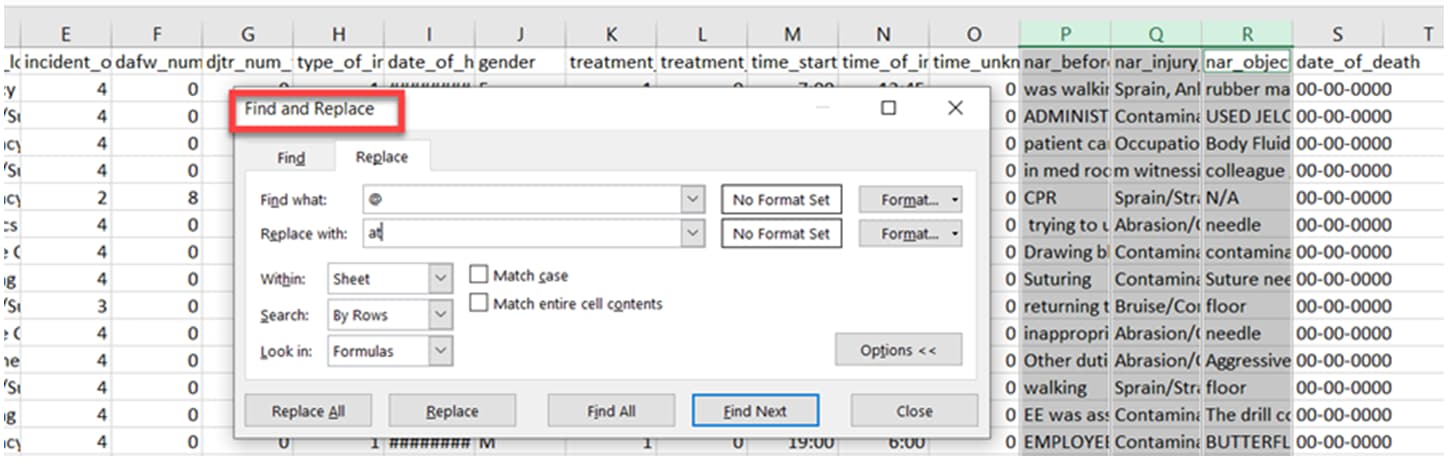
Customers will need to review the entire CSV file for content. OSHA.gov/injuryreporting site has a checklist where they want you to not include special characters for certain columns, and also review to exclude any PII for certain columns, before uploading the CSV file to their API. It is up to the establishment/individuals at the company to review the CSV file and replace or change any content needed according to their business needs, prior to using the file to upload into the OSHA API system. Enterprise Health will not omit or replace data from the CSV output. Enterprise Health will output the CSV with the contents as exactly how it was captured/documented in the system and case/incident. Your business can use the ‘find and replace’ tool in the CSV file and change/replace (according to business needs) any found PII or any found special characters.