ICD-11 Tool Integration
Summary video: https://www.youtube.com/watch?v=0pghXpMtCXU
Phase 1 ICD11 integration into the product is available via a system setting Show ICD11 on Conditions (for international customers typically). For Phase 1, ICD11 will integrate these into the system for system wide use:
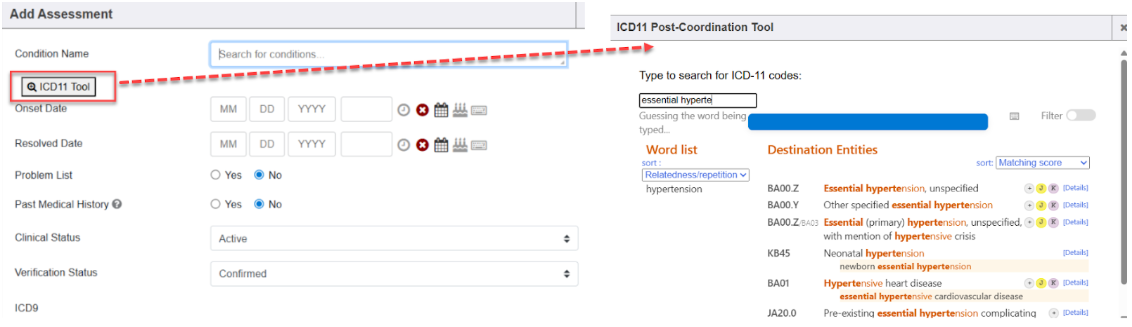
- Allows access to an ICD11 Tool button within editing or adding an assessment to a chart or encounter.

- The ICD11 Tool button opens an ICD11 Post-Coordination Tool screen to search for a condition which then results in an output of various matching condition names with ICD11 codes for selection.
- The ICD11 Post-Coordination Tool screen also allows other functionality.
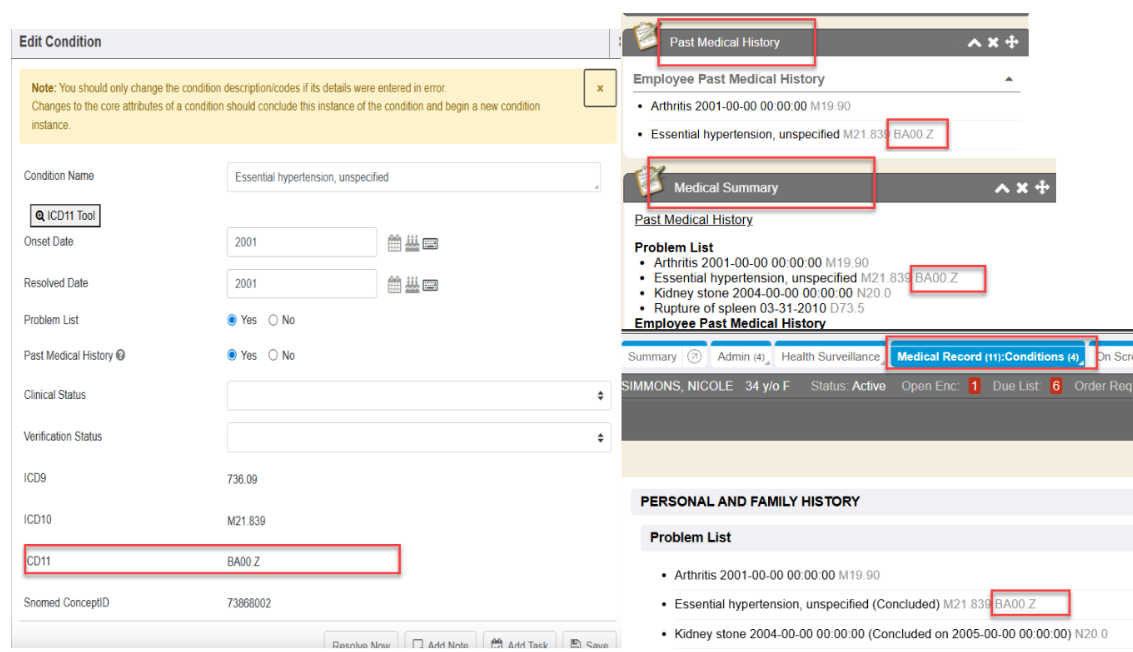
- Allows ICD11 codes for conditions selected using the ICD11 Tool will be visible in these areas:
- Summary Chart Tab → Past Medical History portlet
- Summary Chart Tab → Medical Summary portlet
- Summary Chart Tab → Medical History portlet
- Encounter Smart Plan section & right side Quick List/Problem List
- Encounter Symptoms/Diagnosis section & right side Quick List/Problem List
- Add Condition screen
- Edit Condition screen
- Remove Condition screen
- Conditions Chart Tab → DataVis groupings
- Conditions Chart Tab → Full Conditions View (datavis)

A future TBD Phase 2 integration into our product will include visibility to selected ICD11 code/condition in orders, prescriptions, injections and interfaces that send diagnosis information (ie. billing, radiology orders, lab orders, HIE, etc).
MIE Promo Video: https://www.youtube.com/watch?v=0pghXpMtCXU
Documentation: Enterprise Health :: ICD11 Tool
Video’s & guides by WHO regarding their ICD11 Tool:
- ICD11 Home Page by WHO: https://icd.who.int/en/
- Searching & Sorting help guide: https://icd.who.int/docs/codingtool/en/Searching/
- ICD11 Coding Tool How To Video by WHO: https://youtu.be/eU8MvkRjZpA?feature=shared
- Destination Entities help guide: https://icd.who.int/docs/codingtool/en/Searching/#destination-entities
- Post Coordination Tool help guide: https://icd.who.int/docs/codingtool/en/Postcoordination/
- Post Coordination How To Video by WHO: https://youtu.be/dcz7MUXeN2M?feature=shared
- Coding Notes help guide: https://icd.who.int/docs/codingtool/en/Coding-note/
RC: 202509 and newer