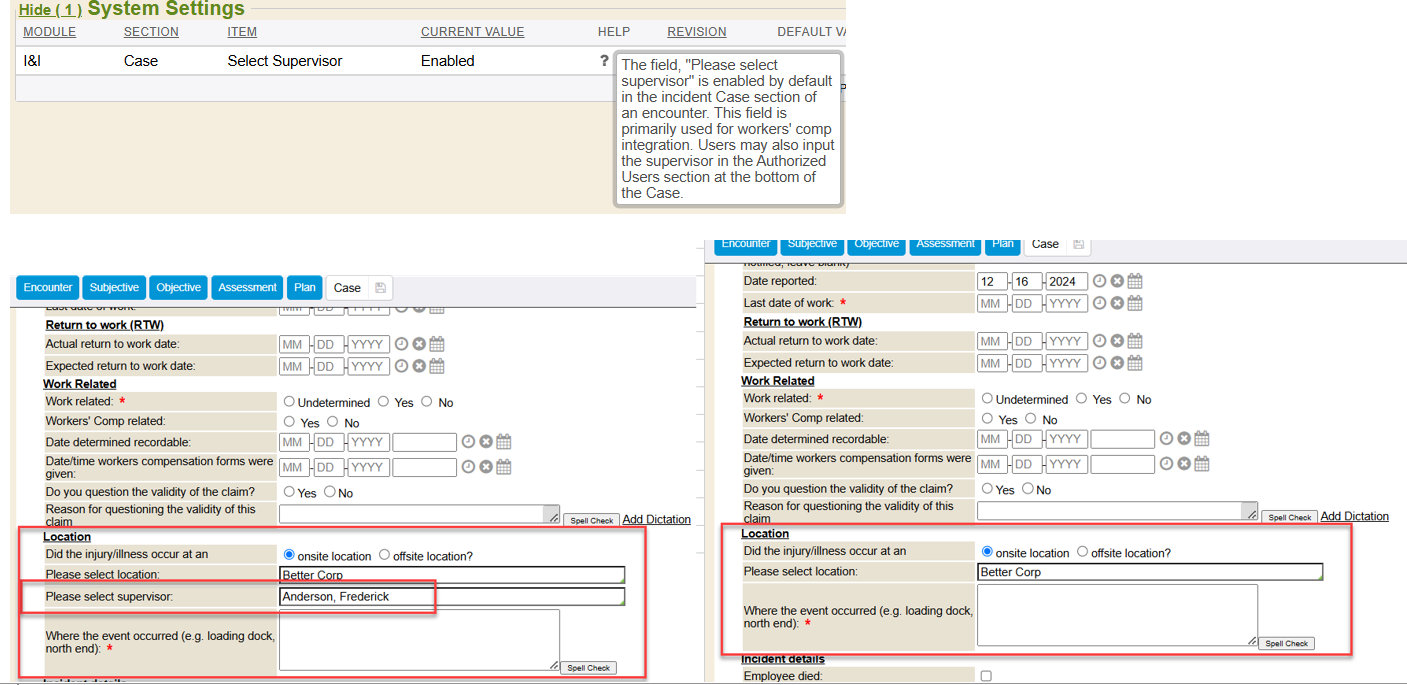
There is a new feature for a system setting to show/hide the ‘select supervisor’ field within a case/incident if onsite location is selected for where the injury/illness occurred.
This new feature is available on the March 2023 upgrade version and newer and includes the following changes:
- Within the Case/Incident section, if documenting the injury/illness occurred at an Onsite location, this system setting (when enabled) will display an additional field of “Please select supervisor”.
- This field is primarily used for workers’ comp integration. In addition, users may also input any supervisor in the Authorized Users section at the bottom of the Case section.
- System setting will be rolled out as ‘enabled’ so it doesn’t disrupt how it currently displays
- Supervisor(s) of an onsite location where an injury/illness occurred may not necessarily the employee’s supervisor, so the auto-complete field outputs search choices of anyone who has a ‘supervisor’ relationship in the system, not just limiting to supervisors directly from the employee chart being worked in.
How do I learn more:
• View the updated existing Add OSHA Case public help guide: Enterprise Health :: Adding OSHA Case